Manual backtesting

Manual backtesting on the TradingView chart you already trade

Manual backtesting means stepping through past candles with the future hidden and taking every trade by hand, the way you would live. It tests a discretionary playbook that cannot be written as code. TestingView adds the session, the risk, the journal, and the statistics to your own TradingView layout.

Works in Chrome, Edge, and Firefox, and in TradingView Desktop on Windows. The free Starter plan holds 20 trades per session.

What manual backtesting is

A backtest asks one question: if you had followed these rules on past prices, what would the record have been? An automated backtest answers it with code. A strategy script reads every bar and fires the entries itself. A manual backtest answers it with you. You replay history bar by bar, decide on each setup as it forms, and write down what happened.

Manual testing is the right tool when the rules live in your judgment: a level you read off a higher timeframe, a pattern you recognize, a session you only trade when it looks a certain way. Those decisions are hard to code honestly. A coded approximation tests the approximation, not you.

Manual and automated backtesting answer the same question with different tools.
Manual backtestingAutomated backtesting
Who takes each tradeYou, bar by bar, with the future hiddenThe script, on every bar
What you need firstA written playbook and the chart you tradeCode, for example a Pine Script strategy or a Python framework
SpeedHours for a sample of dozens of tradesSeconds for thousands of trades
Best atDiscretionary setups, execution practice, trade managementFully mechanical rules, parameter tests, very long samples
Main way it misleadsHindsight and samples that are too smallOverfitting and fills that assume too much

The longer version, with when to switch from one to the other, is on the blog: manual vs automated backtesting.

Why manual backtests go wrong, and what TestingView does about it

A manual backtest is easy to fool, mostly by the person running it. These are the usual leaks, what the software does about each one, and what is still up to you.

Seeing the future

Playback starts in the past and TestingView blocks navigation beyond the session date. Prevent Candle Previews steps back to a completed candle when you change timeframes, so an unfinished higher-timeframe bar cannot give the trade away. It can be off in a new session: turn it on before you trust a multi-timeframe test.

Picking the friendly month

ChronoShuffle opens the session on a random date inside a range you choose, so you do not start on the week you remember. Go to Time can still jump anywhere, so the discipline stays yours.

Taking the trade after it worked

A drawn position opens only when playback reaches its entry. Confirm Entries asks you to accept or reject it at that moment, so the journal records the skips as well as the trades that looked good afterward.

Forgetting the losers

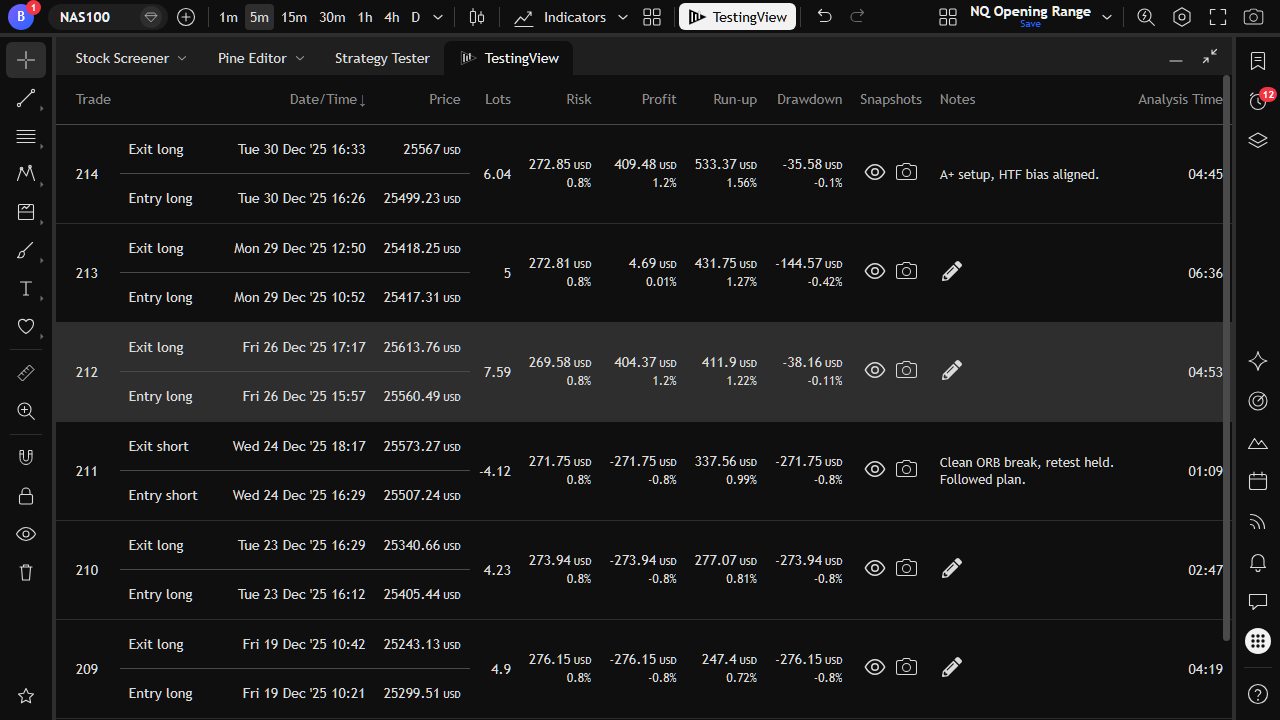
Every trade is written to the journal automatically, with risk, result, run-up, drawdown, and optional snapshots. Review mode jumps the chart back to any closed trade.

Ignoring costs

On the Trader plan, a trading-cost adjustment deducts spread, commission, and slippage from the statistics. On the other plans, read the results as gross, before costs.

Too few trades

Statistics are only as good as the sample. Starter stops at 20 trades per session, Explorer at 50, and Trader has no cap. A short winning run shows the workflow, not the edge.

How a manual backtest runs in TestingView

  1. Open the layout you trade

    TestingView adds a button to TradingView in the browser or in TradingView Desktop. Your indicators, drawings, and multi-chart layout stay where they are.

  2. Start a session

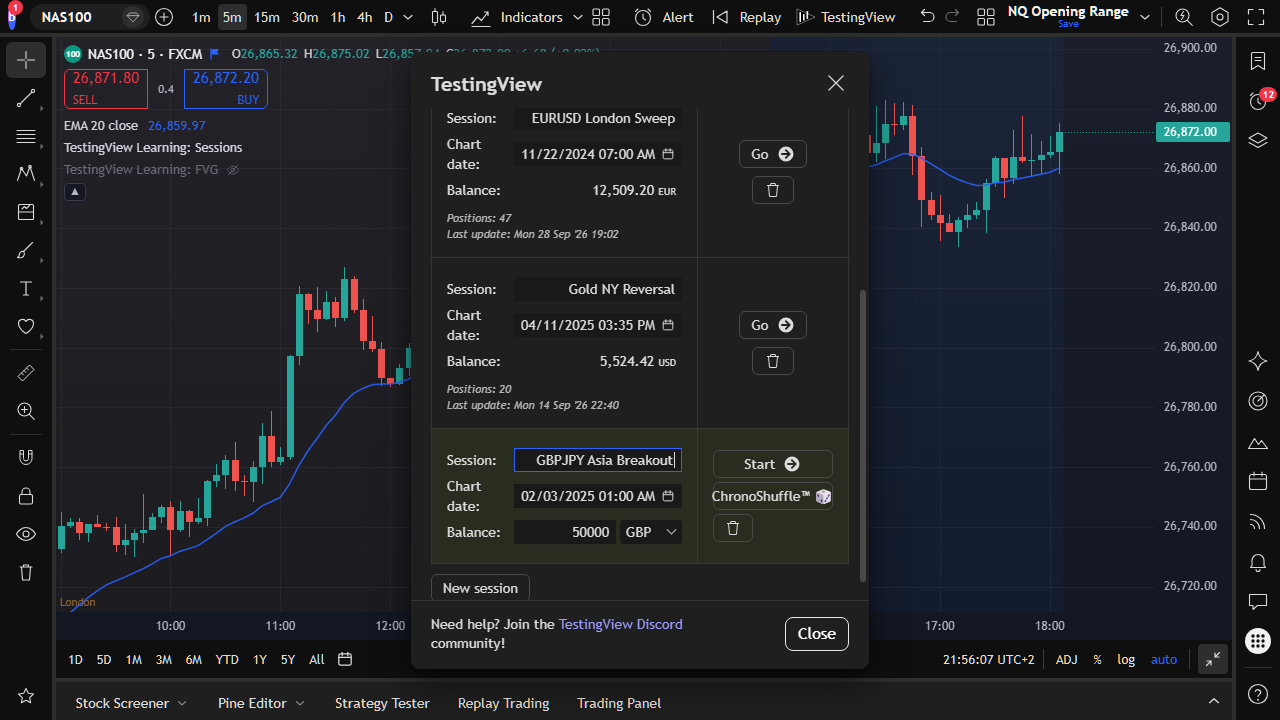
    Name it and set the starting capital, the account currency, and a start date, or let ChronoShuffle pick a random date in a range.

  3. Play candles forward

    Step, fast-forward, or jump with Go to Time. Playback can pause at clock times such as 09:30, at a price line, or on compatible indicator events.

  4. Draw the trade

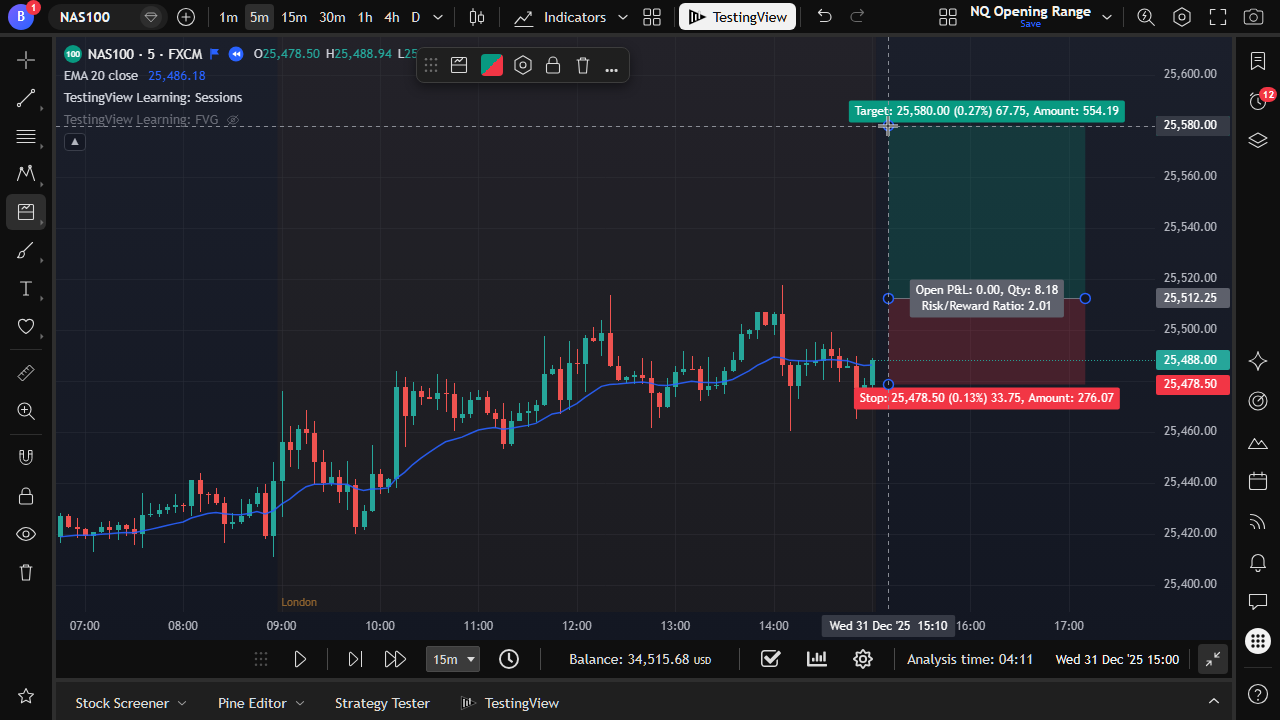
    Use TradingView’s Long or Short Position tool. Set the stop, the target, and the risk as a fixed amount or a percent of the session balance. TestingView opens the trade when price reaches the entry.

  5. Manage it the way you do live

    Move the stop or the target, go to break-even, or close by hand from the journal. The journal keeps the exit you actually took.

  6. Read the record

    After a real sample, read expectancy, profit factor, and drawdown, then split the results by hour, weekday, and setup.

TestingView new session form with session name, starting capital, account currency, and start date
A session holds the capital, the currency, and the start date.
A TradingView Long Position tool drawn on the chart during a TestingView session
Trades are drawn with TradingView’s own position tools.
TestingView backtesting journal listing simulated trades with risk, profit, run-up, and drawdown
The journal fills itself as trades open and close.

What to measure

  • Expectancy: the average result per trade, after the losers. This is the number that says whether the playbook paid.
  • Profit factor: gross profit divided by gross loss.
  • Maximum drawdown: the deepest drop in the session balance, and whether you could have sat through it.
  • Win rate, next to average win and average loss: a high win rate with small winners can still lose money.
  • Results by hour and weekday (Explorer and Trader): where the money actually came from.

Formulas, and how TestingView computes each one, are on the methodology page. For a longer read on why win rate is the wrong headline, see which numbers matter.

When manual backtesting is the wrong tool

  • Your rules are fully mechanical and you want thousands of trades or a parameter sweep. Code them in a Pine Script strategy or a Python framework. It is faster and repeatable.
  • You do not have a defined method yet. A backtest needs rules to test.
  • Your edge depends on order-book fills, queue position, or reaction to news in milliseconds. Candle replay cannot model that.

TestingView works with the data your TradingView account already has. Available history, intraday timeframes, and tick data depend on your TradingView plan and the symbol. One candle cannot prove whether a stop or a target was hit first, and simulated fills are not broker fills. The full list is on the methodology and limitations page.

Questions about manual backtesting

Can I backtest on TradingView without coding?

Yes. TestingView adds a session account, position tracking, a journal, and statistics to your TradingView chart. You step through history with the future hidden and take each trade with the Long and Short Position tools. There is no script to write.

How many trades does a manual backtest need?

There is no single number. You need enough trades to see a losing streak, a drawdown, and more than one kind of market. A 20-trade run shows you the workflow. It says very little about whether the playbook has an edge.

Is manual backtesting less reliable than automated backtesting?

It fails in different ways. Manual tests are exposed to hindsight and small samples. Automated tests are exposed to overfitting and to fills that assume too much. Hidden future candles, random start dates, and an automatic journal reduce the manual risks. They do not remove them.

Does manual backtesting work for forex, futures, stocks, and crypto?

Yes, on the symbols and history your TradingView plan includes. TestingView sizes positions from the symbol’s contract information and stores the currency conversion at entry. Sessions, costs, and data sources still differ by market.

Do I need a paid TradingView plan?

TestingView itself does not require one. Lower-timeframe history is a TradingView plan feature, and TestingView cannot unlock it. If your method trades intraday, check what history your TradingView plan includes first.

Can I practice prop-firm rules with a manual backtest?

You can backtest with the position size and the drawdown limit a prop firm sets, then check whether the sample stayed inside them. A backtest cannot tell you whether you will pass a live evaluation.